Embroidery Basics
What Is a DST File? Complete Guide to the Embroidery DST Format
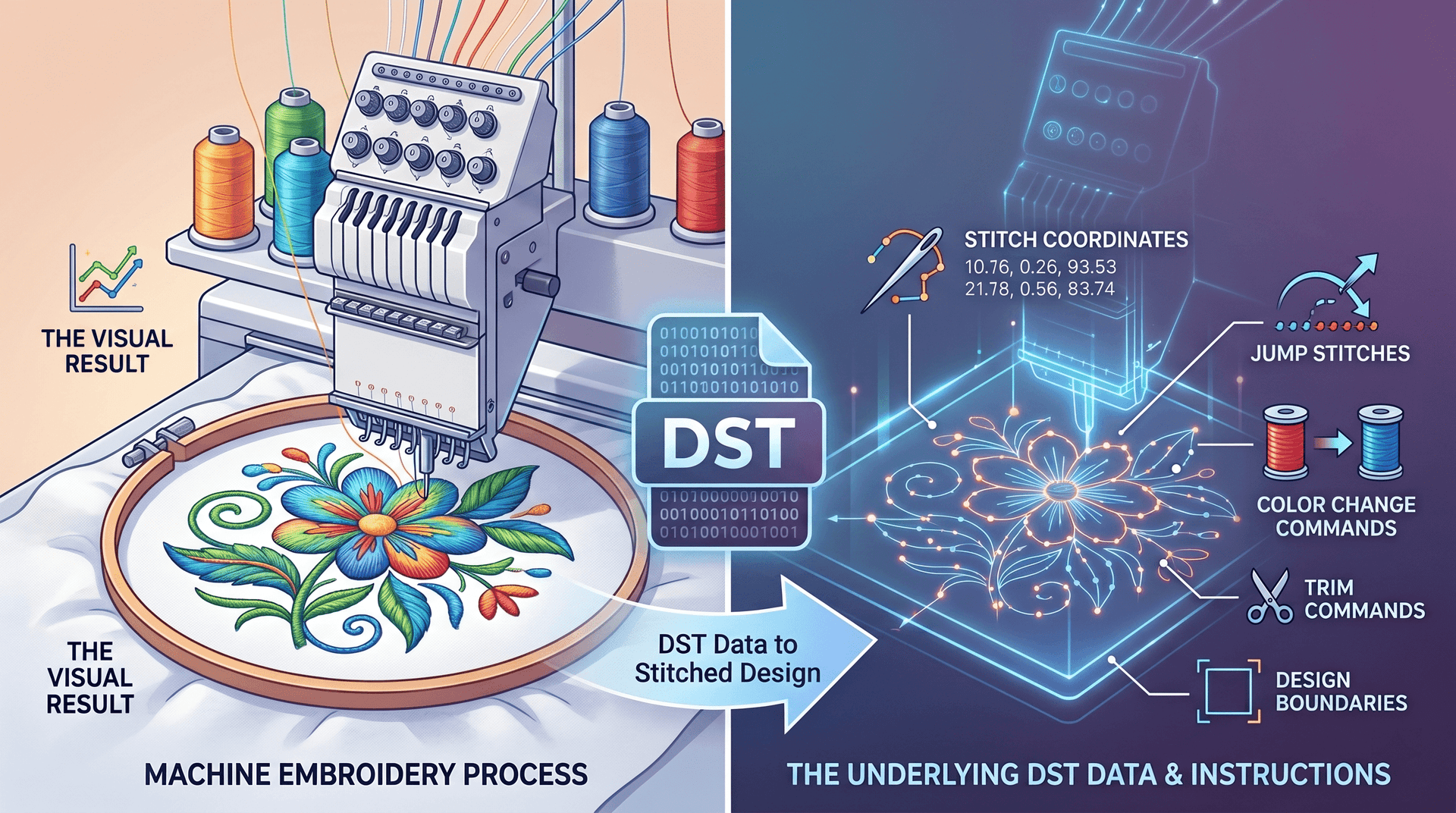
If you're involved in machine embroidery, you've probably come across DST files. The DST format is one of the most widely used embroidery file formats in the industry and is supported by embroidery machines from many manufacturers worldwide.
In this guide, you'll learn what a DST file is, how it works, what information it contains, and how to open and view DST files online.
What Is a DST File?
A DST file is a machine embroidery file format originally developed by Tajima, one of the world's leading embroidery machine manufacturers. DST stands for Data Stitch Tajima.
Unlike image formats such as JPG, PNG, or SVG, a DST file does not store visual graphics. Instead, it contains instructions that tell an embroidery machine exactly how to sew a design.
These instructions include:
- Stitch coordinates
- Jump stitches
- Color change commands
- Trim commands
- Design boundaries
When loaded into an embroidery machine, the DST file guides the machine through the entire stitching process.
Why Is the DST Format So Popular?
The DST format has become the industry standard because it is compatible with thousands of embroidery machines worldwide.
Benefits of DST files include:
- Broad machine compatibility
- Small file sizes
- Fast processing
- Reliable stitching results
- Industry-wide acceptance
Many embroidery shops, digitizers, and apparel businesses use DST files as their primary production format.
What Information Does a DST File Contain?
A DST file contains embroidery machine instructions rather than image data.
Typical DST file data includes:
Stitch Data
Every stitch position is stored as X and Y coordinates that define the sewing path.
Jump Stitches
Jump stitches move the needle from one location to another without stitching fabric.
Color Changes
Color change commands tell the machine when to stop so the operator can switch thread colors.
Trim Commands
Trim commands instruct the machine to cut the thread before continuing to another section of the design.
Design Dimensions
The file contains information about the embroidery area's width and height.
According to embroidery digitizing best practices, minimizing unnecessary jumps and trims helps embroidery machines run more efficiently and produce cleaner designs.
What Does a DST File Not Contain?
A DST file has several limitations compared to modern embroidery formats.
It does not typically store:
- Actual thread colors
- Fabric information
- Advanced object properties
- Editable embroidery objects
- Detailed design metadata
For this reason, professional digitizers often keep the original design file in software-specific formats and export DST only for machine production.
How Are DST Files Created?
DST files are created through a process called embroidery digitizing.
Digitizing converts artwork, logos, or illustrations into machine-readable embroidery instructions.
During digitizing, the designer determines:
- Stitch types
- Stitch directions
- Density settings
- Underlay settings
- Pull compensation
- Sewing sequence
- Pathing strategy
The goal is to create an embroidery design that runs smoothly on the machine while maintaining high stitch quality.
Common Stitch Types Found in DST Files
Most DST embroidery designs are created using three primary stitch types:
Running Stitch
Running stitches are commonly used for outlines, fine details, and travel paths.
Satin Stitch
Satin stitches create smooth borders, text, and decorative elements.
Fill Stitch
Fill stitches are used to cover larger areas and create solid embroidered sections.
How to Open a DST File
There are several ways to open a DST file:
Embroidery Software
Professional embroidery programs can load and display DST designs.
Embroidery Machines
Most commercial embroidery machines can read DST files directly.
Online DST Viewer
A free online DST viewer allows you to inspect embroidery designs directly in your browser without installing software.
Using an online DST viewer, you can:
- Preview stitch patterns
- Zoom into details
- Check design dimensions
- Analyze stitch counts
- Review color changes
- Inspect jump stitches
How to View DST Files Online
The easiest way to view a DST file is with an online DST viewer.
Simply:
- Upload your DST file
- Wait for the design to render
- Inspect stitches and embroidery paths
- Zoom and pan around the design
- Review embroidery statistics
Online viewing eliminates the need to install specialized embroidery software.
Try the free EmbroidAI DST viewer
Upload a .dst and preview stitches, colors, and dimensions right in your browser.
Common Uses of DST Files
DST files are widely used for:
- Corporate logo embroidery
- Custom apparel
- Uniform embroidery
- Hat embroidery
- Jacket back designs
- Promotional products
- Commercial embroidery production
Because of their reliability and compatibility, DST files remain one of the most trusted embroidery formats in the industry.
DST File vs Image File
Many beginners assume a DST file is simply an image.
However, there is a major difference:
| Image File | DST File |
|---|---|
| Stores pixels | Stores stitches |
| Used for display | Used for embroidery machines |
| JPG, PNG, SVG | DST |
| Visual graphics | Machine instructions |
An embroidery machine cannot directly sew a JPG or PNG image. The artwork must first be digitized into a DST file.
Frequently Asked Questions
What does DST stand for?
DST stands for Data Stitch Tajima.
Can I convert a JPG to a DST file?
Yes. However, conversion requires embroidery digitizing. Simply changing the file extension will not create a usable embroidery file.
Can embroidery machines read DST files?
Yes. DST is one of the most widely supported embroidery machine formats.
Are DST files editable?
DST files can be edited in embroidery software, but they contain stitch data rather than fully editable design objects.
How can I view a DST file for free?
You can use a free online DST viewer to upload and preview embroidery designs directly in your browser.
Conclusion
The DST format remains the most widely used embroidery machine file format in the industry. By storing stitch coordinates, jump stitches, trims, and color change instructions, DST files allow embroidery machines to accurately reproduce designs on fabric.
Whether you're an embroidery professional, digitizer, or beginner, understanding DST files is essential for creating high-quality embroidery designs and ensuring smooth machine operation.