AI-Powered Embroidery Digitizing in Minutes
Upload a logo, sketch, or photo and EmbroidAI converts it into production-ready stitch files — DST, PES, EXP, JEF, and VP3 — with AI-generated satin, fill, and running stitches. No manual digitizing, no steep software.
Upload Image
PNG · JPG · SVG
AI Processing
Threads & colors
Stitch Generation
Satin · fill · run
DST Export
Machine ready
Workflow
From artwork to stitches in four steps
A digitizing pipeline that used to take an expert an hour now runs in minutes.
Upload Artwork
Drop a logo, sketch, photo, or vector. We accept PNG, JPG, SVG, and WEBP up to 20 MB.
AI Analysis
EmbroidAI detects shapes, edges, and colors, then maps them to thread regions automatically.
Auto Digitizing
Satin, fill, and running stitches are generated with underlay, pathing, and pull compensation.
Export Machine Files
Download DST, PES, EXP, JEF, or VP3 — ready to load straight onto your machine.
Already have a DST file? Preview it now.
Open any embroidery DST file right in your browser — realistic thread simulation, colors, design size, stitch count and estimated runtime. Nothing to install, nothing uploaded.
True-to-thread preview
See realistic stitches on studio, t-shirt, cap, denim and more.
Stitch-by-stitch simulation
Watch the design sew and estimate machine runtime.
Recolor every thread
Try alternate thread combos before you stitch.
Read the details
Stitch count, colors and exact size from the DST header.
Quality score out of 10
A transparent, penalty-based score with a category breakdown.
Micro & long-stitch detection
Flags the tiny and overlong stitches that break thread.
Local density map
Catches dense hot-spots that cause puckering and holes.
Actionable fixes
Deterministic, ranked suggestions for every issue found.
Is your DST file ready to stitch?
Upload a DST file and get an instant quality score out of 10 — stitch-length stats, micro and long-stitch detection, jumps, trims, color changes, local density and hoop fit, plus rule-based fixes. No login, nothing stored.
Turn text into embroidery in seconds.
Type a word, set the height, stitch length and spacing, pick DST or PES, and get a machine-ready embroidery file with a realistic preview. No design skills, nothing to install, nothing uploaded.
Type any word
Turn text straight into clean, machine-ready lettering stitches.
Control the dimensions
Set letter height, stitch length and spacing in millimetres.
Instant live preview
See realistic thread simulation the moment it's generated.
Download DST or PES
Grab a ready-to-stitch file with stitch count and exact size.
Capabilities
Everything a digitizer does — automated
Professional stitch generation, underlay, and pathing built into one simple workspace.
AI Auto Digitizing
Turn any image into stitches automatically — no manual tracing.
Running Stitch Generation
Clean outlines and detail lines with optimized run paths.
Satin Stitch Generation
Smooth, glossy satin columns for lettering and borders.
Fill Stitch Generation
Dense tatami fills with adjustable angle and spacing.
Fabric Profiles
Presets for knit, twill, cap, towel, and more.
Auto Underlay
Stabilizing underlay generated beneath every region.
Pull Compensation
Shapes stay true after the fabric pulls during sew-out.
Smart Pathing
Minimized jumps and trims for faster, cleaner runs.
Color Optimization
Reduce and sequence thread colors intelligently.
Multi-Format Export
DST, PES, EXP, JEF, VP3, XXX, and HUS in one click.
See it in action
From flat artwork to lifelike thread
Drag the slider to compare the original image with EmbroidAI's stitch simulation — the same preview you get before exporting.
- Thread-accurate stitch rendering
- True-to-machine color sequencing
- Inspect every stitch before you sew
 Original
 Embroidered
Why EmbroidAI
A better way than traditional digitizing
Skip the expensive software and the learning curve.
Advanced features
On the roadmap
Where EmbroidAI's stitch engine is headed next.
Exports to every major machine format
One design, any machine. Generate the format your hardware needs.
Free design library
Download free embroidery designs
Browse a growing library of machine-ready designs. Preview any design in your browser, then download a free DST, PES, EXP, JEF or VP3 file.

FAQ
Questions, answered
Everything you need to know about AI embroidery digitizing.
Digitizing is the process of converting artwork into a stitch file a machine can read — defining stitch types, directions, density, and color order. EmbroidAI does this automatically with AI.
EmbroidAI exports DST, PES, EXP, JEF, VP3, XXX, and HUS, covering Tajima, Brother, Melco, Janome, Pfaff, and most commercial machines.
Yes. After AI digitizing you can adjust colors, stitch density, underlay, and pathing in the editor before exporting.
Generated files include underlay, trims, and color stops, so they load directly onto your machine. Because they are produced automatically, we recommend previewing every design and running a test stitch-out before a production run.
You can set a default fabric — knits, twill, caps, towels, denim, felt, fleece and leather — and pick a stitch density and pull compensation to suit it. Automatic per-fabric tuning of those values is on our roadmap.
For logos, text, and clean artwork, results are production-grade out of the box. Complex photographic art may need light touch-ups in the editor.
Blog
Our latest blog
Guides, tutorials, and tips on machine embroidery, DST files, and digitizing.
 Embroidery Basics
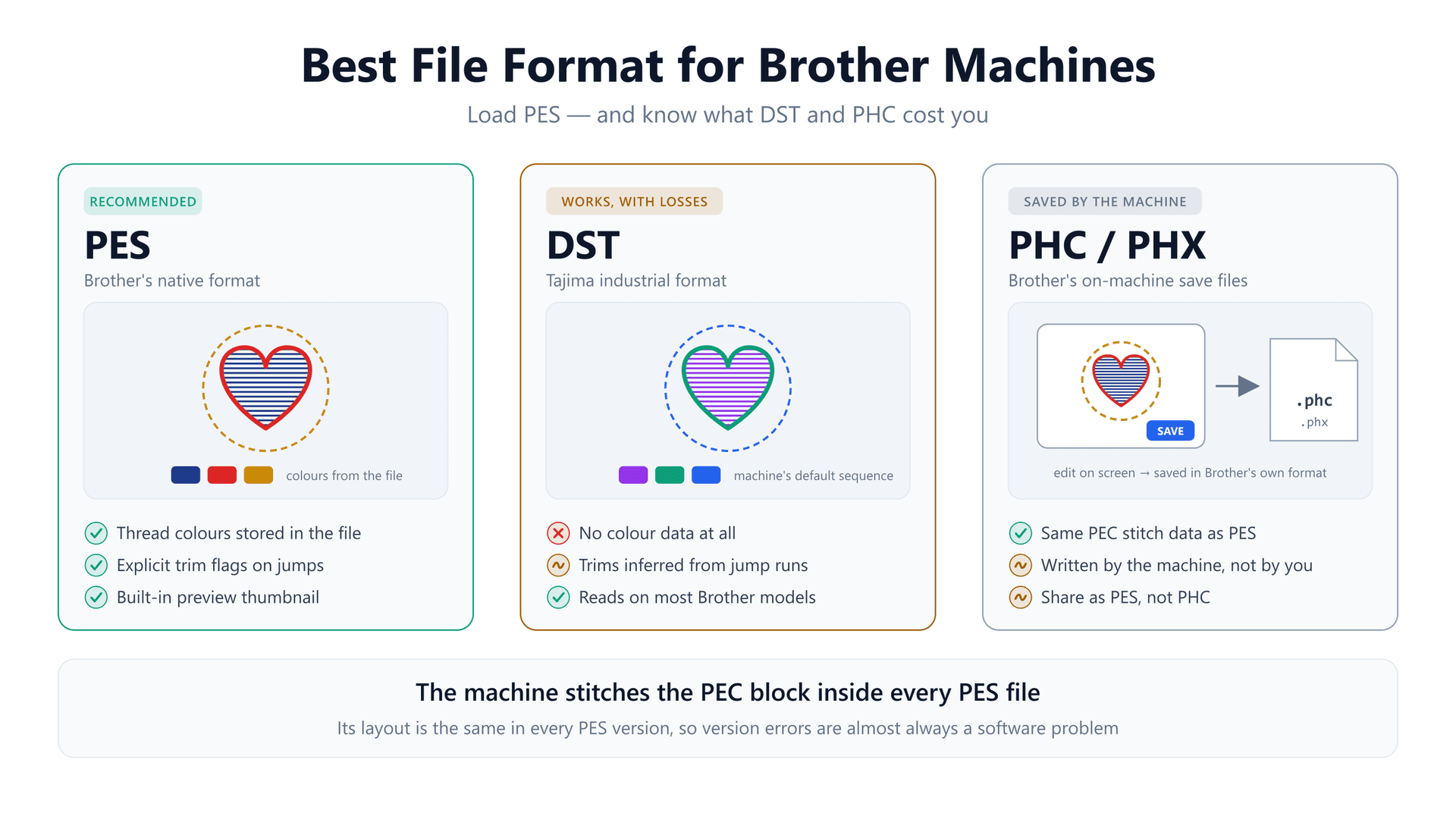
Best File Format for Brother Embroidery Machines (PES vs DST vs PHC)
The short answer is PES — but the useful part is why. A Brother machine only reads one block inside a PES file, which explains why DST loads in the wrong colours, why PES version errors are a software problem, and what to check when a file won't load.
11 min readRead article Embroidery Basics
How Does Auto Digitizing Work? Inside the Image-to-Stitch Pipeline
Auto digitizing isn't one magic step — it's six rule-based decisions, and the one that matters most is measuring each shape in millimetres. Know the rules and you can predict, and prevent, most bad results.
11 min readRead article Embroidery Basics
The 6 Types of Underlay in Embroidery — and How to Pick the Right One
Most guides list the underlay types and stop there. The useful question is which one to pick, and the answer is not taste — it falls out of the width of the shape and the direction the top stitch runs.
12 min readRead article
Ready to turn artwork into embroidery?
Join the shops shipping machine-ready stitch files in minutes, not hours.