Embroidery Basics
What Is an EMB File? The Complete Guide to Wilcom's Native Format
 By Varmil Kakadiya12 min read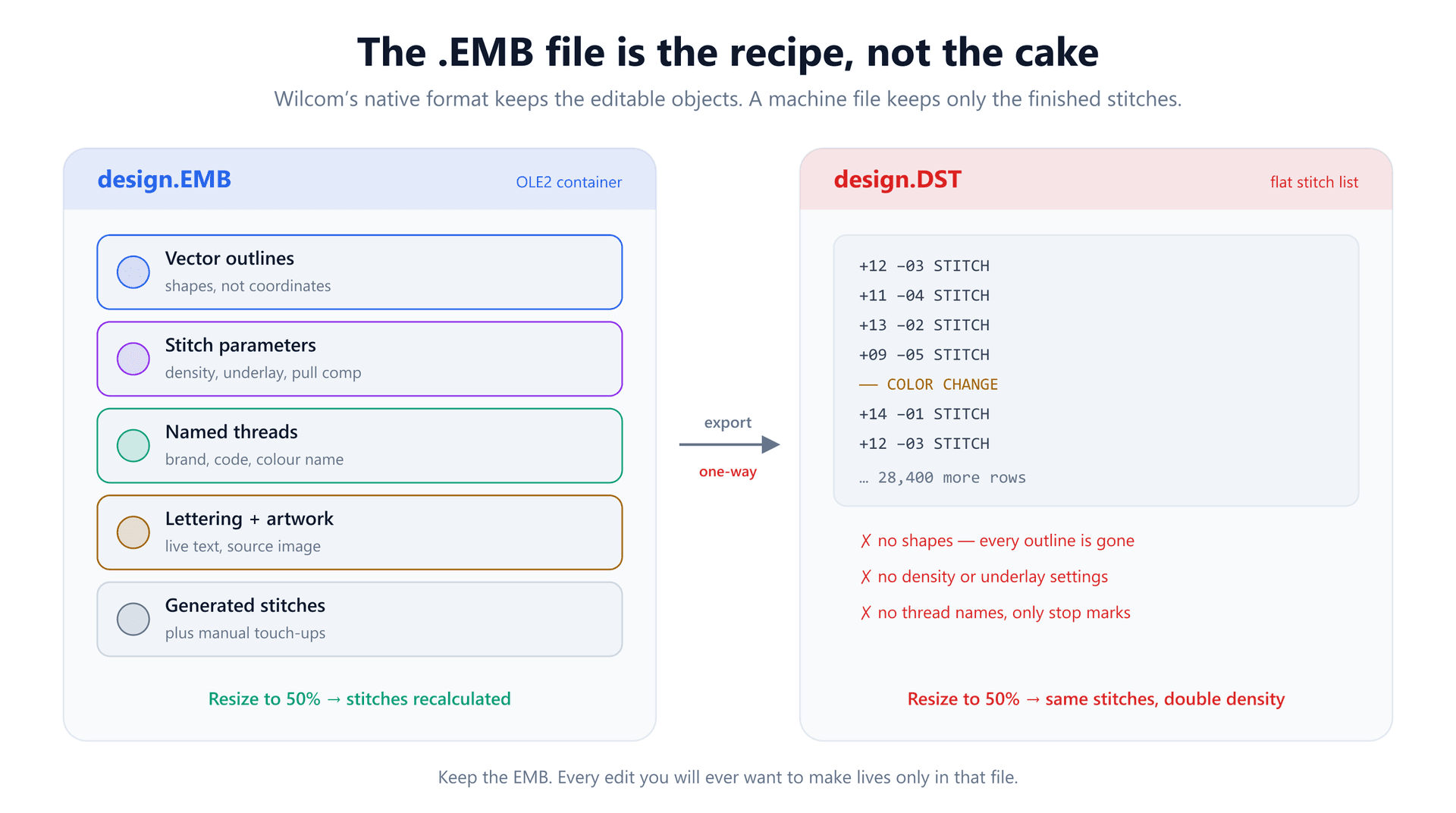
A digitizer sends you two files: a 40 KB DST that your machine runs perfectly, and a 4 MB EMB that your machine refuses to see at all. A year later you need the logo 30% smaller. The DST comes out stiff and distorted, and you discover the EMB you never opened was the only file that could have saved you.
That is the whole story of the EMB format in one paragraph. It is not a machine file and was never meant to be one. It is the editable master — and the reason it matters is not that it holds more data, but that it holds a fundamentally different kind of data.
This guide covers what is actually inside an EMB, the structural reason a machine can never read one, what you lose the moment you export, how to open one without buying Wilcom, and the two gotchas — version compatibility and reversed color bytes — that catch people who thought they had a working file.
What an EMB File Actually Is
EMB is the native format of Wilcom EmbroideryStudio and its home-and-small-business sibling, Hatch. Wilcom has been an embroidery software company since 1979, and EMB is where its designs live while they are still being worked on.
The critical distinction is between a design file and a machine file. A machine file answers one question: where does the needle go next? A design file answers a much richer one: what shapes make up this logo, and how should each one be converted into stitches? An EMB answers the second question and keeps the answer to the first as a by-product.
Concretely, an EMB carries the vector outlines of every shape; the stitch type assigned to each one (satin, fill or running); the density, underlay and pull compensation settings behind each object; live lettering that is still editable text rather than baked-in stitches; the thread list with real brand names and catalogue codes; frequently the original artwork the design was traced from; and the generated stitches themselves, including any manual stitch-by-stitch touch-ups.
Wilcom's documentation puts it plainly: outlines, stitches, thread colors and other data are stored together, so a design can be scaled and manipulated on an object basis while the stitch data preserves manual edits. Both layers coexist in one file. That dual nature is what makes the format worth understanding.
Inside the File: a Filesystem in a Single File
Here is the part most explanations skip, and it is the part that explains the format's real-world quirks. An EMB is not a custom binary blob with a bespoke header. It is a Microsoft OLE2 compound document — the same container technology that older Office formats like .doc and .xls used.
An OLE2 file behaves like a tiny filesystem sealed inside one file. It has a directory, and that directory holds named streams that work like files in folders. You can verify this yourself: open any EMB in a hex editor and the first eight bytes are always D0 CF 11 E0 A1 B1 1A E1, the OLE2 signature.
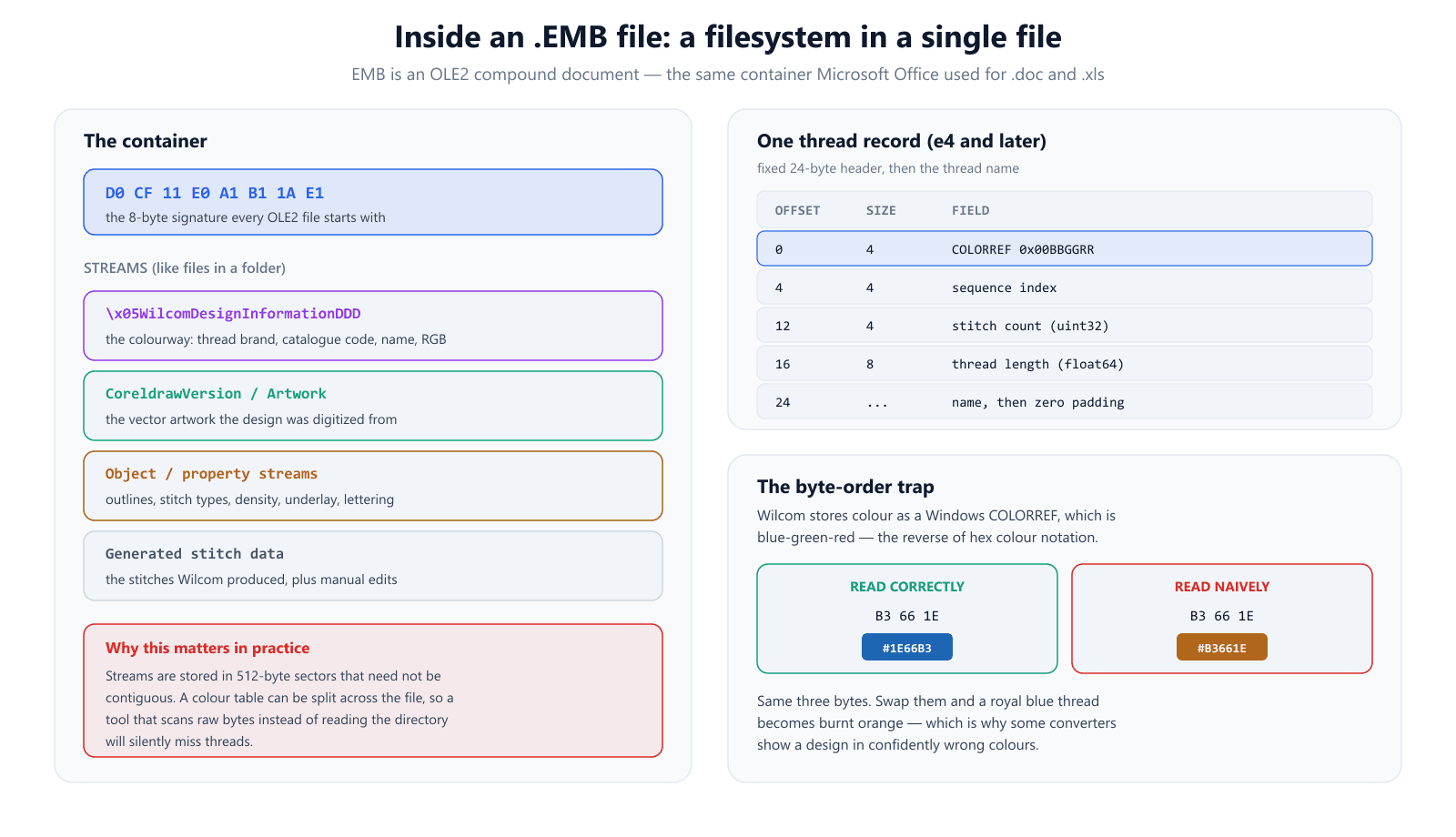
Inside that container, different kinds of design data occupy different streams. The thread palette — what Wilcom calls the colorway — lives in a stream named WilcomDesignInformationDDD. The vector artwork sits in its own stream. Object properties and generated stitches occupy others.
Two practical consequences follow from this structure, and both show up as bugs in tools that ignore it.
First, streams are not necessarily contiguous. OLE2 stores data in sectors that can be scattered through the file, exactly like a fragmented disk. A tool that scans raw bytes looking for a color table — rather than reading the directory and reassembling the stream properly — can have a color row split across a sector boundary and silently miss threads. The design opens, looks fine, and is quietly missing a color.
Second, the layout changed between versions. Older e2/e3-era files store the colorway as a plain tab-delimited ASCII table. From e4 onward there is no text table at all: each color block became a fixed-layout binary record, 24 bytes of header followed by the thread name. The header packs the color as a 4-byte integer, then a sequence index, then a 4-byte stitch count, then the thread length as an 8-byte float. Any tool that reads EMB colors has to handle both layouts, because both are still in circulation.
The reversed-bytes color trap
That 4-byte color value is worth dwelling on, because it causes a specific and very recognizable failure. Wilcom stores it as a Windows COLORREF, and a COLORREF is laid out 0x00BBGGRR — blue, then green, then red. Hex color notation runs the other way: #RRGGBB.
So the same three bytes read in the wrong order give you a different, entirely plausible-looking color. The bytes B3 66 1E are royal blue #1E66B3 read correctly, and burnt orange #B3661E read naively. Nothing errors. You just get a design confidently rendered in the wrong colors. If you have ever converted an EMB and found the palette bizarrely off while the shapes were perfect, this is very often why.
Why No Embroidery Machine Can Stitch an EMB
People often assume this is a licensing restriction, or that machine manufacturers simply chose not to support Wilcom. It is neither. It is a mismatch in what the file describes.
An embroidery machine is a fairly simple device: move the needle by this offset, stitch, repeat, stop here to change thread. A machine format like DST encodes precisely that and nothing else — relative movements and a handful of control commands, with no notion of a shape.
An EMB describes objects and the rules for turning them into stitches. Honoring it would mean the machine had to run a digitizing engine: computing satin columns across a shape, generating underlay beneath it, applying pull compensation. Wilcom's software does that work on a PC, and then exports the flattened result. The machine is a playback device, and it needs the flattened version.
This is why the EMB-to-machine-format step is called exporting rather than saving as. It is a rendering operation, and like any rendering it is lossy in one specific direction.
What the Export Actually Destroys
When you export an EMB to DST, the stitches survive intact — the design will sew exactly as intended. What disappears is everything that made the file editable:
- The outlines. Every shape becomes an anonymous run of coordinates; there is no longer a circle, only stitches that happen to sit on one.
- The parameters. Density, underlay type, pull compensation and stitch-type assignments are gone — they were inputs to a calculation whose output is all that remains.
- Live lettering. Text becomes stitches. You cannot correct a misspelling in a DST; you can only re-digitize the word.
- Thread identity. DST stores no colors at all, just stop marks. Brand names and catalogue codes do not survive.
- The source artwork.
And this loss is the reason resizing behaves so differently between the two. Scale an EMB and the software regenerates stitches for the new dimensions, holding your density constant in millimetres — the stitch count changes because it should. Scale a DST and all you can do is multiply coordinates: shrink to 50% and every gap between stitches halves too, doubling the effective density. That is the mechanism behind a resized design coming out stiff as a board, and why stitch density is the number to watch. As a rule of thumb, 10–20% is about as far as a stitch file can be scaled before quality suffers visibly.
It also explains why converting a DST back to an EMB is not a real recovery. Wilcom can import a stitch file and re-vectorize it into objects, which genuinely helps if that is all you have — but it is inferring shapes from stitch positions, not recovering the originals, because the originals were never in the file. Wilcom's own wording is careful here: most objects are re-vectorized to assist editing, not restored to their original state.
How to Open or Convert an EMB File
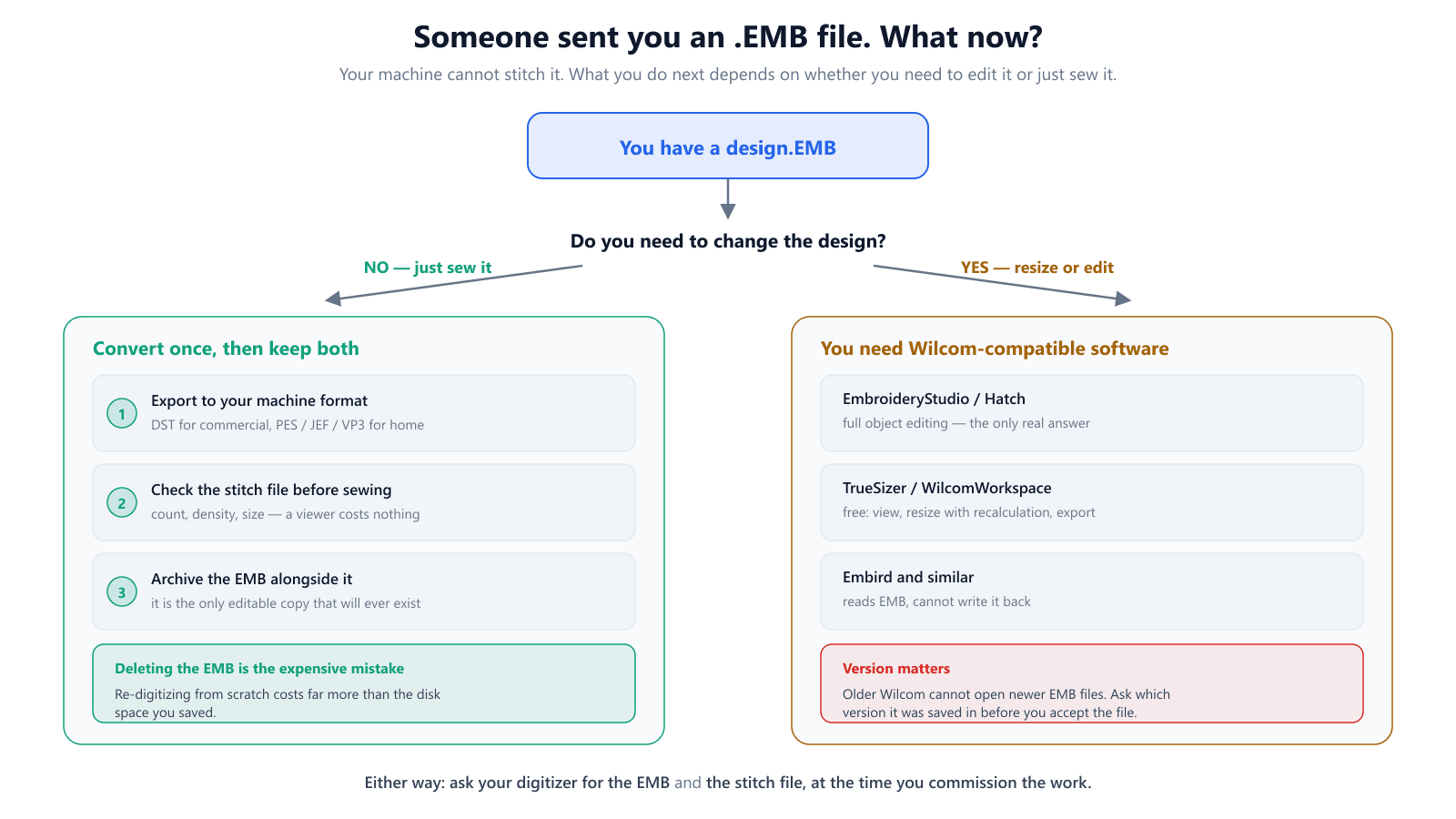
What you should do with an EMB depends entirely on whether you need to change the design or merely sew it.
If you only need to sew it
Export once to the format your machine takes — DST for most commercial machines, PES, JEF or VP3 for home machines — then check the exported file before you commit fabric to it. Stitch count, density and finished dimensions are all worth a look, and none of them requires the original software. You can open the exported file in our free DST viewer to see the real stitch paths, or run it through the DST analyzer for density and count figures.
Then archive the EMB next to the stitch file. It is a few megabytes, and it is the only editable copy of that design that will ever exist.
If you need to edit or resize it
Full object editing means Wilcom-compatible software — either EmbroideryStudio or Hatch. There is no open-source equivalent that reads EMB objects, and third-party converters that claim to edit EMB are generally converting to stitches first.
Short of that, Wilcom's free TrueSizer and the browser-based WilcomWorkspacewill open an EMB, resize it with proper stitch recalculation, and export to major machine formats. For the common case of "I just need this 20% smaller and stitched properly", that free path is usually enough. Embird reads EMB but cannot write it.
Be skeptical of generic online "EMB viewers". Many render a stored preview thumbnail rather than genuinely parsing the design, so you see a picture without reliable stitch or thread data behind it.
The Version Problem Nobody Warns You About
EMB compatibility runs forward, not backward. A file saved from a recent EmbroideryStudio release will frequently refuse to open in an older installation, and Wilcom has applied proprietary encryption within its current formats that can prevent newer EMB files from being read by earlier software. Support for e4.5 has also ended, so that route receives no further fixes.
The practical upshot is a question to ask before money changes hands. If you are commissioning digitizing, ask which Wilcom version the EMB will be saved from, and confirm it opens in whatever you or your production partner actually run. If you are sending an EMB to someone else, ask what they use and save down a version if you can — and always include a stitch file so they are not blocked entirely.
Why You Should Always Ask for the EMB
Many digitizing services deliver only a stitch file by default. Some provide the source file on request; some charge extra for it; some decline, because the EMB is the reusable asset and the DST is the disposable output.
Ask for it at commissioning time, in writing, as part of the deliverable. The cost of adding it upfront is small. The cost of needing it later — when the client wants the logo on caps as well as jackets, or the brand color shifts, or a word in the tagline changes — is paying to digitize the same artwork twice. A design you hold the EMB for is an asset you can revise indefinitely. A design you only hold a DST for is frozen.
If you are generating designs yourself rather than commissioning them, the same principle applies to whatever your tool treats as its source. Our image-to-embroidery converter works from your artwork each time, so the artwork is the master copy — keep the original vector or high-resolution image, not just the stitch file it produced.
EMB Versus the Machine Formats
It helps to place EMB in the wider landscape. Machine formats differ mainly in which manufacturer's equipment they target and how much thread information they carry — but they are all stitch files, all flattened, all on the same side of the divide.
- EMB — Wilcom design source. Editable objects. No machine reads it.
- DST — the Tajima commercial standard. Stitches and stop commands, no thread colors at all.
- PES — Brother, Baby Lock and Bernina. A stitch file that does embed a thread palette.
- JEF / VP3 / EXP — Janome, Husqvarna Viking and Pfaff, and Melco respectively. Stitch files with varying color support.
- EMB is the only one of these you would ever open to change a shape.
If you are weighing up which machine format to deliver in, the DST versus PES comparison covers that choice, and the DST format guide explains why DST's missing color data behaves the way it does.
The EMB Checklist
- Treat the EMB as the master and the stitch file as output — never the reverse.
- Ask for the EMB when you commission digitizing, in writing, not a year later.
- Archive the EMB alongside every delivered stitch file; it is the only editable copy.
- Confirm which Wilcom version an EMB was saved from before accepting it.
- Resize from the EMB when you can; keep stitch-file scaling within about 10–20%.
- Never rely on DST-to-EMB conversion to recover a lost master — it re-vectorizes, it does not restore.
- If converted colors look wrong but shapes look right, suspect reversed COLORREF bytes.
- Check any exported stitch file for count, density and size before committing fabric.
Conclusion
An EMB file is the recipe; a DST is the cake. The recipe can be adjusted, scaled and rewritten indefinitely. The cake can only be served — or, if you resize it, crumbled. Both are legitimate things to own, but only one of them lets you change your mind later.
So keep the EMB, ask for it upfront, check which version it came from, and export machine files from it as often as you need. Then verify what you exported before it reaches fabric — you can drop any DST into our free DST viewer and see exactly what the machine is going to sew, or start from artwork in the image-to-embroidery converter if the master file is already lost.
Frequently Asked Questions
What is an EMB file?
An EMB file is the native design format of Wilcom EmbroideryStudio and Hatch. Unlike a machine file such as DST or PES, it stores the design as editable objects — vector outlines, the stitch type assigned to each shape, density and underlay settings, pull compensation, live lettering, named threads, and the original artwork — alongside the stitches Wilcom generated from them. It is the editable master copy of a design, which is why digitizers treat it as the source file.
Why won't my embroidery machine stitch an EMB file?
Because an EMB does not primarily describe stitches; it describes the objects that produce stitches. An embroidery machine wants a flat sequence of needle movements and stop commands, which is exactly what DST, PES, JEF and VP3 provide. The machine has no interpreter for outlines, density values or lettering objects, so the file is meaningless to it. You export a machine format from the EMB and send that to the machine.
How do I open an EMB file for free?
Wilcom's free TrueSizer and the browser-based WilcomWorkspace both open EMB files, let you resize them with proper stitch recalculation, and export to formats like DST and PES. Embird can read EMB but not write it. Full object-level editing — changing a shape, its stitch type or its underlay — requires EmbroideryStudio or Hatch. Generic 'EMB viewer' sites often only render a thumbnail rather than truly reading the design.
Can I convert a DST file back to an EMB file?
Not in any meaningful sense. Wilcom can import a DST and re-vectorize it into editable objects, but it is reconstructing shapes by inferring them from stitch positions — it is not recovering the original objects, because that information is not in the DST. Wilcom's own documentation says the majority of objects will be re-vectorized to assist editing, not that the original state is restored. Treat any EMB produced this way as a fresh starting point, not as the original master.
Why does an EMB file resize better than a DST?
Because the EMB still knows the shapes. Scale it and the software regenerates stitches for the new size, keeping your density in millimetres constant, so the stitch count changes. A DST has only fixed coordinates: scaling multiplies them, so shrinking to 50% halves every gap between stitches and doubles the effective density, which is how a resized DST ends up stiff and boardy. Roughly 10–20% is the usual safe limit for scaling a stitch file.
Should I ask my digitizer for the EMB source file?
Yes, and ask at the time you commission the work rather than a year later. Without it, every future change — a size beyond what the stitch file tolerates, a thread swap, a text edit — means paying to digitize again. Not every digitizer includes the source file by default, and some charge extra for it, so make it part of the original agreement.
Why do the thread colors look wrong after converting an EMB file?
Wilcom stores each thread's color as a Windows COLORREF integer, which is laid out blue-green-red — the reverse of the red-green-blue order hex notation uses. A converter that reads those bytes in the wrong order produces a confidently wrong color: a royal blue thread becomes burnt orange. If a conversion looks plausibly colored but wrong, byte order is a likely cause, and re-exporting from Wilcom itself is the fastest fix.
Can an older version of Wilcom open a newer EMB file?
Often not. Newer EmbroideryStudio releases write EMB files that earlier versions refuse to open, and Wilcom has applied proprietary encryption within its current formats. Compatibility runs forward, not backward. If you are receiving an EMB, ask which version it was saved from; if you are sending one to someone on older software, ask them what they run and save down or supply a stitch file alongside it.