Embroidery Basics
The Best File Format for Tajima Embroidery Machines (and What It Leaves Out)
 By Varmil Kakadiya11 min read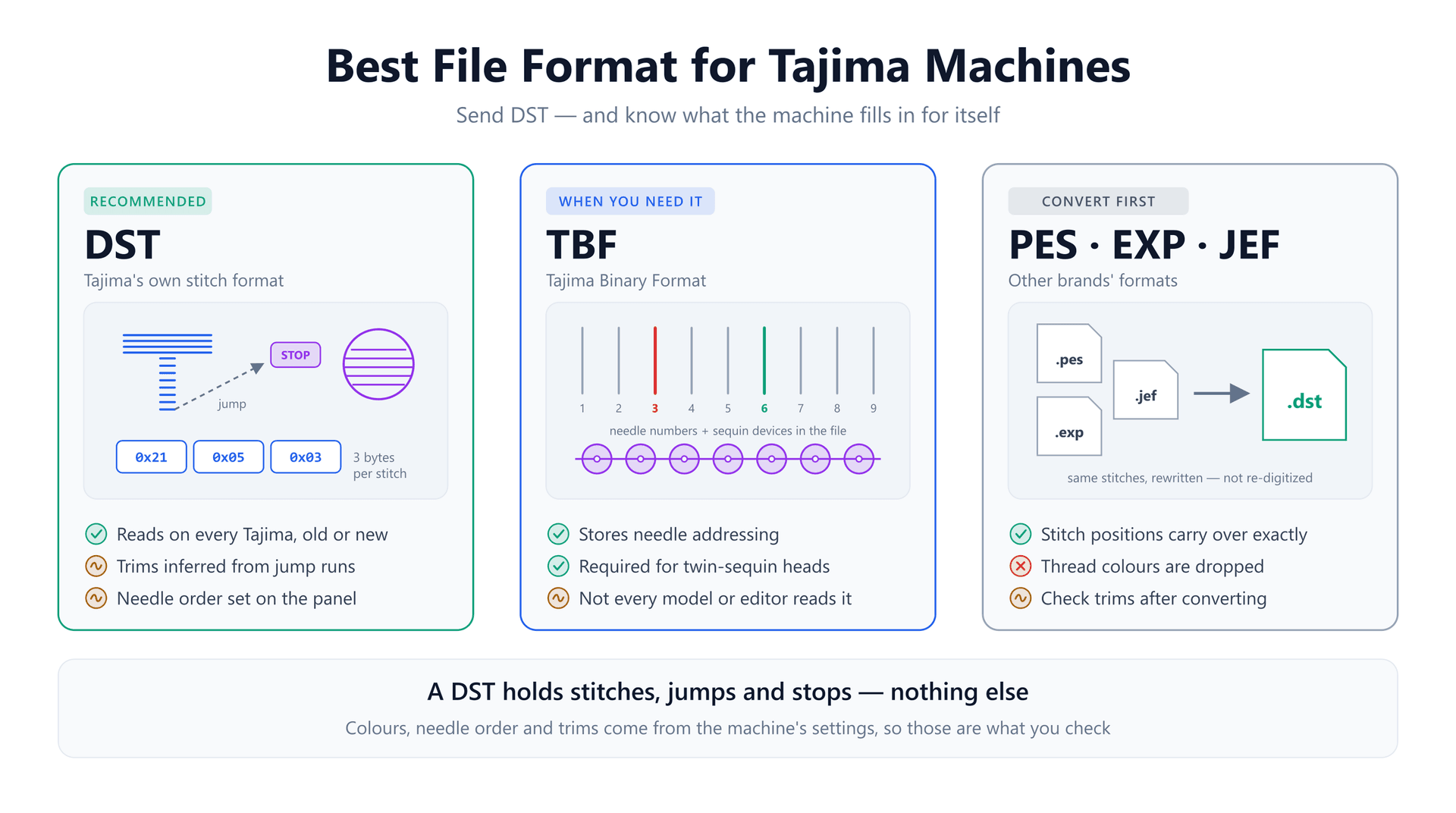
A customer emails a logo file. You load the DST on your Tajima, set it running, and walk away. When you come back, the lettering has long threads strung between every letter, the second colour ran on the wrong needle, and the border trimmed halfway round for no reason. Nothing is wrong with the file format — DST is exactly what a Tajima wants. So what went wrong?
Every guide will tell you the best format for a Tajima is DST, and that is correct. What they skip is that a DST is deliberately bare. It carries the stitches and almost nothing else, and the machine fills in the rest from its own settings. When those settings don't match what the digitizer assumed, you get the problems above, in a file that is otherwise perfect.
This guide covers what is actually inside a DST, the three things a Tajima decides for itself, when you need TBF instead, and a short routine for running a DST from someone else without surprises.
The Short Answer: DST, With TBF for Special Heads
DST is Tajima's own format, and every Tajima machine reads it: older heads with floppy drives, current single-heads like the TMEZ-SC (9, 12 or 15 needles, up to 1,200 stitches per minute), and the multi-head TMAR and TFMX lines. Because Tajima was the industrial standard for decades, DST is also the one format every digitizing program exports and every commercial shop can open.
TBF, the Tajima Binary Format, is the specialist option. It stores needle addressing on top of the stitches, and Wilcom notes that designs for Tajima machines with a twin-sequin attachment must be in TBF. For chenille-enabled machines, Wilcom lists a third format, T01. If your machine has none of that hardware, DST is the answer and you can stop worrying about the others.
What Is Actually Inside a DST File
A DST has two parts. The first is a 512-byte text headerwritten as short labelled fields. Only about 125 bytes are used; the rest is padding. The fields that matter are the design label (LA, 16 characters), the record count (ST), the number of colour changes (CO), and the design's extents in each direction. Some machines use the record count to show progress and the extents to check the design fits the frame before stitching.
The second part is the stitch data: one 3-byte record for every movement of the frame. Each record encodes a move on X and Y as a sum of five signed weights — 1, 3, 9, 27 and 81 — a scheme called balanced ternary. Add them all up and the largest possible move is 121 units on each axis. One unit is 0.1 mm, so a single record can travel at most 12.1 mm.
Two bits in the third byte say what kind of record it is. There are only four kinds:
- Normal stitch — the needle goes down at the new position.
- Jump — the frame moves but the needle stays up.
- Colour change or stop — one code for both, which matters later.
- Sequin mode — used by machines with a sequin device.
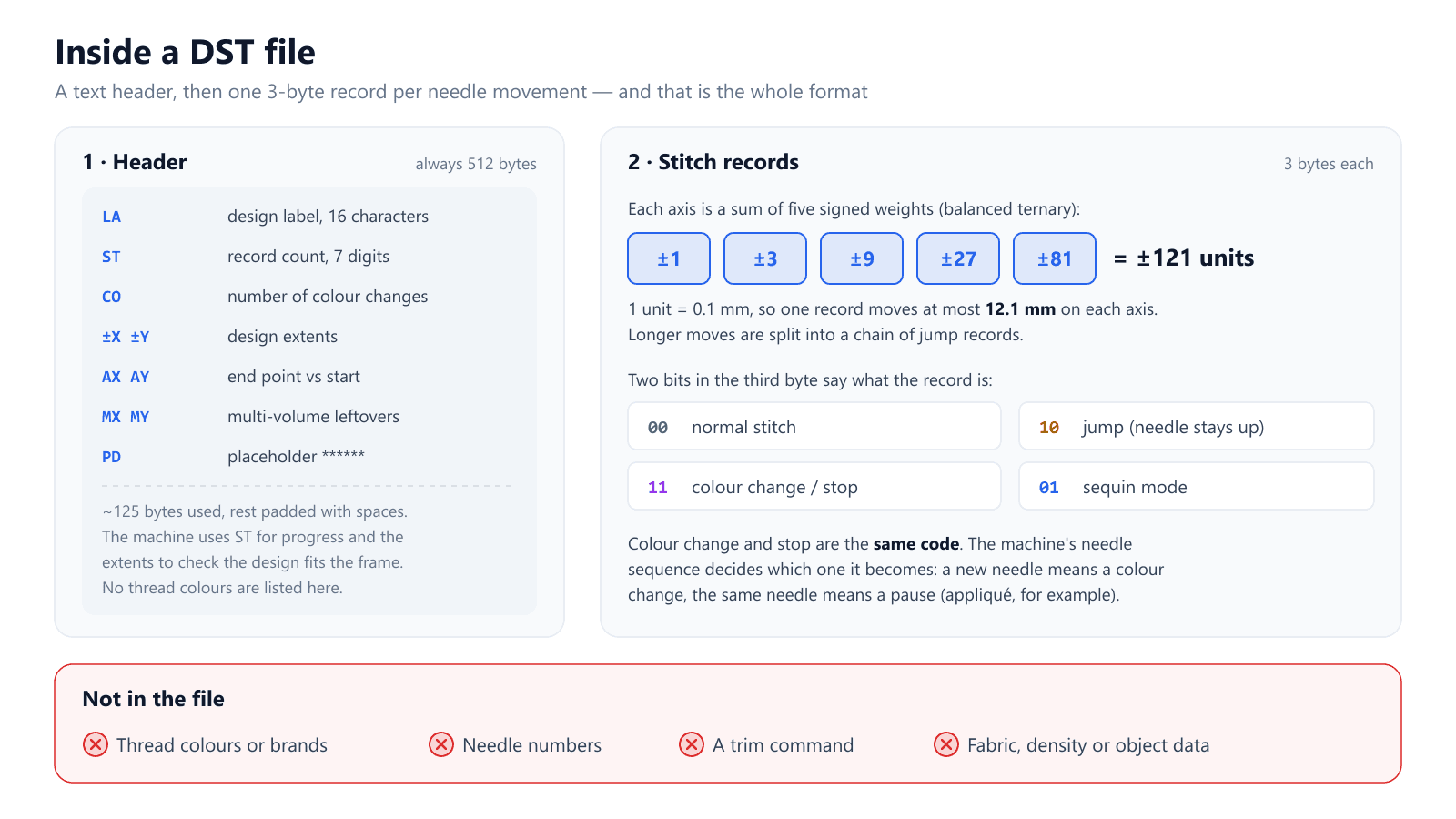
Look at what that list leaves out. There is no thread colour, no needle number, and no trim. A DST knows thatthe colour changes after stitch 4,820; it has no idea which colour comes next or which of your 12 needles holds it. And there is no record type that means "cut the thread here". Those three gaps explain almost every DST problem on a Tajima.
The Three Things a Tajima Decides for Itself
1. Which needle each colour block uses
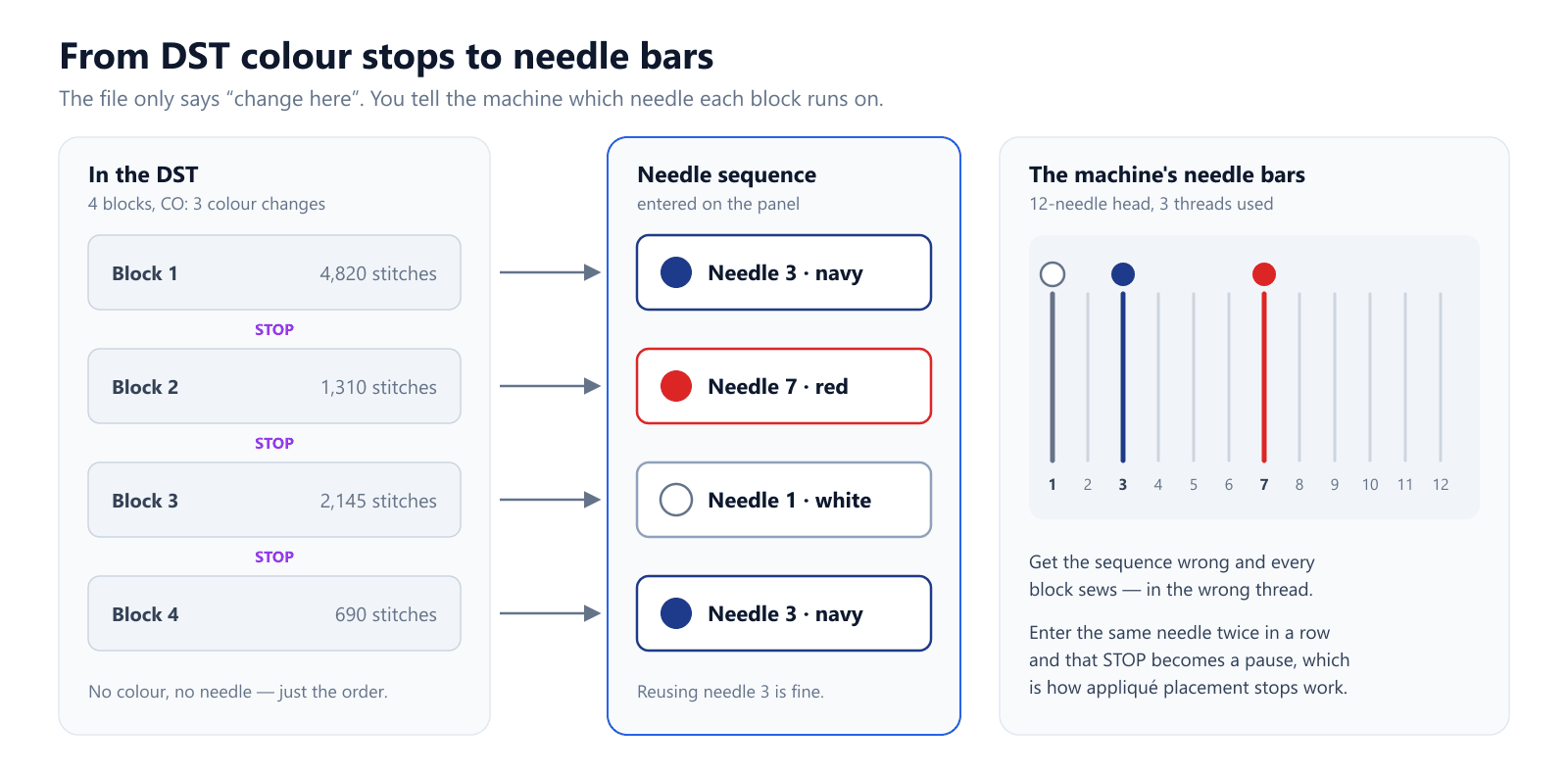
Since the file only marks where changes happen, the operator tells the machine which needle to use for each block. This is the needle sequence you enter on the control panel: block 1 on needle 3, block 2 on needle 7, and so on. The number of entries you need is the CO value in the header plus one.
Two consequences follow. First, a DST counts colour changes, not colours: a three-colour logo that returns to navy at the end has four blocks, and you enter needle 3 twice. Second, because colour change and stop share one code, the needle sequence decides which one you get. Enter a different needle and the machine changes colour. Enter the same needle as the block before and it simply pauses — exactly what you want for appliqué placement and tack-down stops.
2. Where to trim
With no trim command available, the DST world settled on a convention: a run of consecutive jump records means "cut here". Digitizing software inserts tiny jumps that cancel each other out — for example +2, −4, +2 units — so the frame barely moves but the machine sees the run. On Tajima machines the setting that reads this is called Jump Convert, and the factory value is 3: three or more jumps in a row become a trim.
The catch is that both sides have to agree. If someone raised Jump Convert to 4 or 5, a file digitized for 3 stops trimming and you get the strung-out lettering from the opening. Set it to 2 and the machine trims far more often than the digitizer planned. Brother's manual for its own DST-reading multi-needle machines states the rule plainly: the jump count must match the number used when the Tajima data was created, or trims will be missed or added.
3. How to handle moves longer than 12.1 mm
This is the one almost nobody explains, and it ties the first two together. A travel move longer than 12.1 mm can't fit in one record, so the writing software splits it into a chain of jumps. A 20 mm move becomes two jump records. A 30 mm move becomes three.
The machine can't tell why the jumps are there. It just counts them. So with Jump Convert at 3, any travel move longer than 24.2 mm triggers a trim whether the digitizer asked for one or not. That is the border trimming "for no reason" in the opening: the design jumped more than 24.2 mm between two sections, and three jump records looked identical to a planned cut.
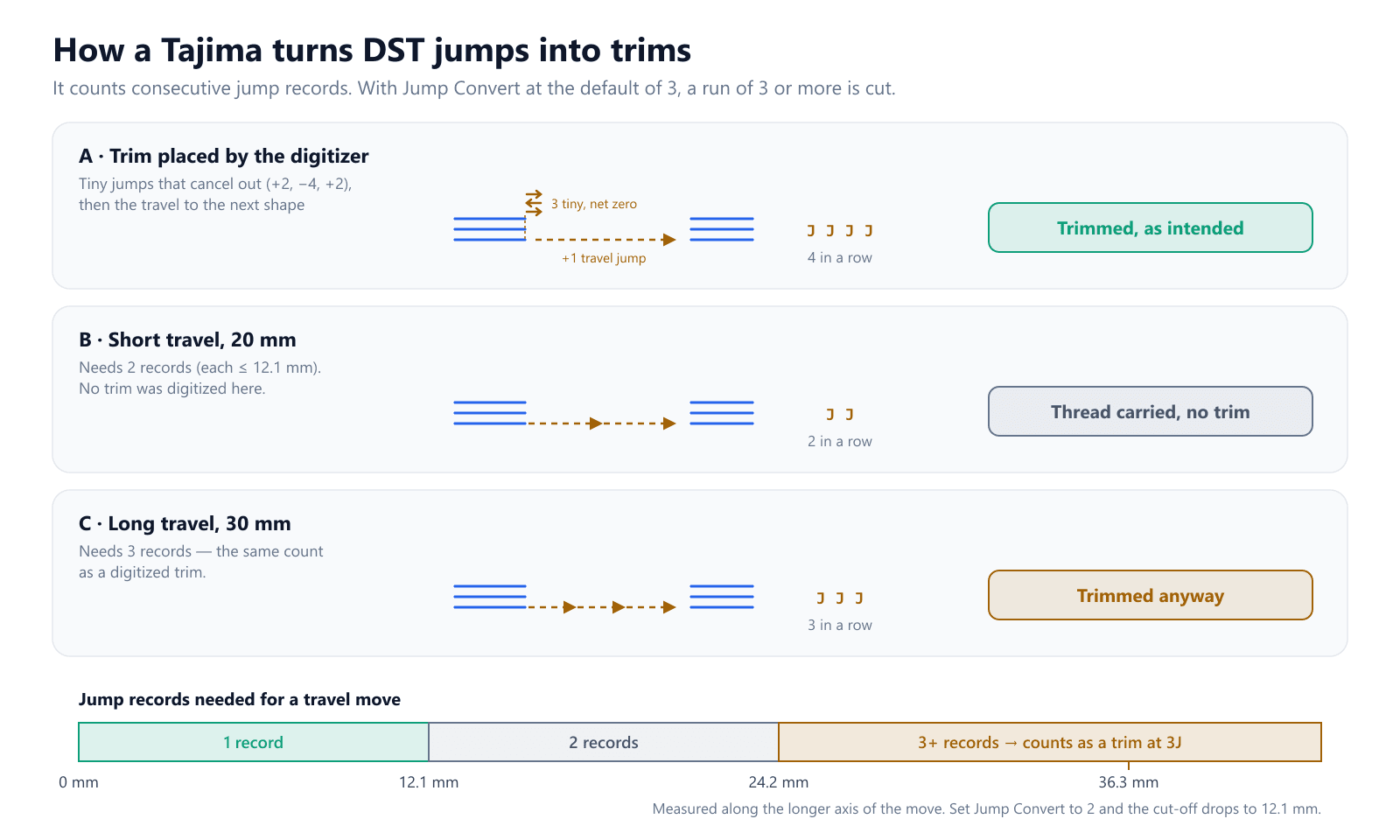
Most of the time this is harmless — a 25 mm float would usually be trimmed anyway. It matters in two cases. If you lowered Jump Convert to 2, every travel past 12.1 mm is cut, which means far more trims and slower runs. And if a long satin column is wider than 12.1 mm, the writer has to insert a jump inside the column to reach the far side. Those extra jumps are what forum posts about "too many jumps in my DST" usually turn out to be. Keeping satin columns under about 12 mm wide avoids the problem entirely.
Starting from a logo or picture? Get a Tajima-ready DST with satin columns kept inside one record.
Try the AI digitizerWhen You Need TBF Instead
TBF exists to close the needle gap. Because it stores needle addressing, a TBF design arrives with each block already assigned to a needle, and the machine doesn't need an operator to type in the sequence. That is a convenience on an ordinary head, but on a machine with a twin-sequin attachment it is a requirement: the file has to say which sequin device and which needle each section uses, and DST has no way to say it.
TBF is not a complete replacement, though. ZSK's format documentation notes that TBF carries colour only as RGB values, with no thread brand or catalogue number, so you still match threads by eye or by chart. Support is also uneven. One Tajima owner on the Pulse forum reported a TMEZ-1501 rejecting a TBF file that ran fine when saved as DST from the same design. If you don't have sequin or mixed chenille hardware, send DST.
Chenille is its own case. On a pure chenille machine, Wilcom notes that DST is typical, with the stop code used to switch between chain and moss stitch. Combination chenille-and-embroidery heads use TBF so that head assignments travel with the file.
PES, EXP, JEF and Other Formats
Files from other brands — Brother's PES, Melco's EXP, Janome's JEF — need converting before a Tajima will read them. Barudan's DSB and ZSK's DSZ are close relatives of DST but use their own variations, so don't rename them and hope. Conversion is a translation, not re-digitizing: every one of these formats describes the same needle positions, jumps and stops, so a converter rewrites them as DST without moving a stitch.
What doesn't survive is anything DST can't hold. A PES carries real thread colours; the DST made from it doesn't, so note the colour list before converting. Trims that were explicit flags in the source become jump runs in the DST, so the Jump Convert agreement from earlier now applies to that file. Our free embroidery file converter handles DST and PES in the browser, and the DST ⇄ EXP converter covers Melco files. For the Brother side of the same question, see the best file format for Brother machines.
Before You Run a DST From Someone Else
Five checks, cheapest first. Together they take a couple of minutes and prevent the three failures from the opening.
- Open the file in a viewer and read the stops. Count the colour changes and compare them with the colour chart that came with the design. A chart with four colours and a DST with six blocks means returns or appliqué stops you need to plan for.
- Ask how trims were encoded. If the digitizer exported with three-jump trims, Jump Convert should be 3. If you can't ask, run the file once on scrap and watch the first few trims.
- Look for long travel moves. Anything over 24.2 mm will trim at the default setting. If a section is meant to carry thread to the next one, that will surprise you.
- Enter the needle sequence from the chart. One entry per block, CO plus one in total, reusing needles where a colour returns and repeating the same needle where you want a pause.
- Check the size against the frame. The header extents give the design's size; trace the design on the machine before the first stitch.
The DST viewer shows stitch paths, jumps and colour stops for the first check, and the DST analyzer reports stitch, jump and trim counts with the design's dimensions, which covers the second, third and fifth.
Things That Fail Quietly
A few problems don't announce themselves at load time and only show up on the garment:
- Colours in the header. A handful of programs write thread colours into the unused part of the DST header. Most machines ignore them, so don't assume the colours you saw in software will appear on the panel.
- Label truncation. The LA field holds 16 characters, and some older machines display fewer. Keep design names short and distinct so you load the right one.
- Machines with different settings. A shop with two Tajimas can have Jump Convert set differently on each. The same file then trims correctly on one and strings threads on the other.
- Scaling on the panel. Resizing a DST on the machine keeps the stitch count fixed. Shrinking by more than 10–20% packs the stitches too tightly; get a version digitized at the right size instead.
If you want the background on how stops, jumps and trims are encoded across formats, our guide to jumps, trims and colour changes goes deeper.
Tajima File Format Checklist
- Send DST to any Tajima unless the head has sequin or combination chenille hardware.
- Use TBF when needle addressing must travel with the file, and always for twin-sequin attachments.
- Convert PES, EXP and JEF to DST; keep the colour list, because DST won't.
- Match Jump Convert to the digitizer's trim encoding — the factory value is 3.
- Expect any travel over 24.2 mm to trim at 3, and over 12.1 mm at 2.
- Keep satin columns under about 12 mm wide so no jumps land inside them.
- Enter CO plus one needles in the sequence; repeat a needle to make a pause.
- Trace the design against the frame before the first stitch.
Conclusion
The best format for a Tajima is DST, and the reason it causes trouble is the same reason it works everywhere: a DST holds only stitches, jumps and stops, so the machine supplies the needle order and decides where to trim by counting jump records, each of which can travel no more than 12.1 mm. Know those two rules and almost every DST surprise becomes predictable.
If you're starting from artwork rather than a finished file, the EmbroidAI image-to-embroidery converter exports a DST with satin columns capped at 12 mm, so every stitch fits in a single record. For more on the format itself, see what is a DST file and DST vs PES.
Frequently Asked Questions
What file format does a Tajima embroidery machine use?
DST is Tajima's native stitch format, and every Tajima machine reads it, from older floppy-drive heads to current TMEZ and TMAR models. Some machines also read TBF, Tajima's binary format, which adds needle numbers and is required for twin-sequin attachments. Formats from other brands, such as PES, EXP and JEF, should be converted to DST first.
What is the difference between DST and TBF for Tajima?
Both carry the same stitches. DST stores only stitches, jumps, colour-change stops and sequin codes, so the operator sets the needle order on the machine. TBF also stores needle addressing, which lets a design arrive with its needles pre-assigned and is mandatory for twin-sequin heads. Not every machine or editor reads TBF, so DST is the safer default.
Why is my Tajima not trimming between letters or shapes?
A DST file has no trim command. The machine creates a trim when it sees a run of consecutive jump records, controlled by the Jump Convert setting, which defaults to 3. If the setting was raised above the number of jumps the digitizer used, or the file came from software that encodes trims differently, the cuts are skipped. Match the setting to the digitizer's export.
Why does my Tajima trim where the design shouldn't be trimmed?
Usually because a long travel move was split into several jump records. One DST record can move at most 12.1 mm, so any travel longer than 24.2 mm needs at least three jumps, which a machine set to 3 counts as a trim. If Jump Convert is set to 2, any travel longer than 12.1 mm is cut.
Does a DST file store thread colours?
No. A standard DST records where colour changes happen, not which colours they are. A few programs write thread colours into the unused part of the 512-byte header, but machines generally ignore it. On a Tajima you assign a needle to each colour block on the control panel, using the design's colour chart.
Can I use a PES file on a Tajima machine?
Not directly. PES is Brother's format, and Tajima machines expect DST or TBF. Convert the PES to DST first. The stitch positions carry over unchanged, but the thread colours stored in the PES are lost, so keep the colour list to set up the needle sequence.
How do I set up a colour change stop for appliqué on a Tajima?
In a DST, a colour change and a stop are the same code. What the machine does depends on the needle sequence you enter: give the next block a different needle and it changes colour; give it the same needle and the machine pauses on the same thread, which is how appliqué placement and tack-down stops are run.
What is the maximum stitch length in a Tajima DST file?
One DST record can move 121 units, or 12.1 mm, on each axis. A longer stitch or travel is written as a chain of jump records followed by the final stitch. Keeping satin columns under 12 mm wide avoids those extra jumps inside a column.